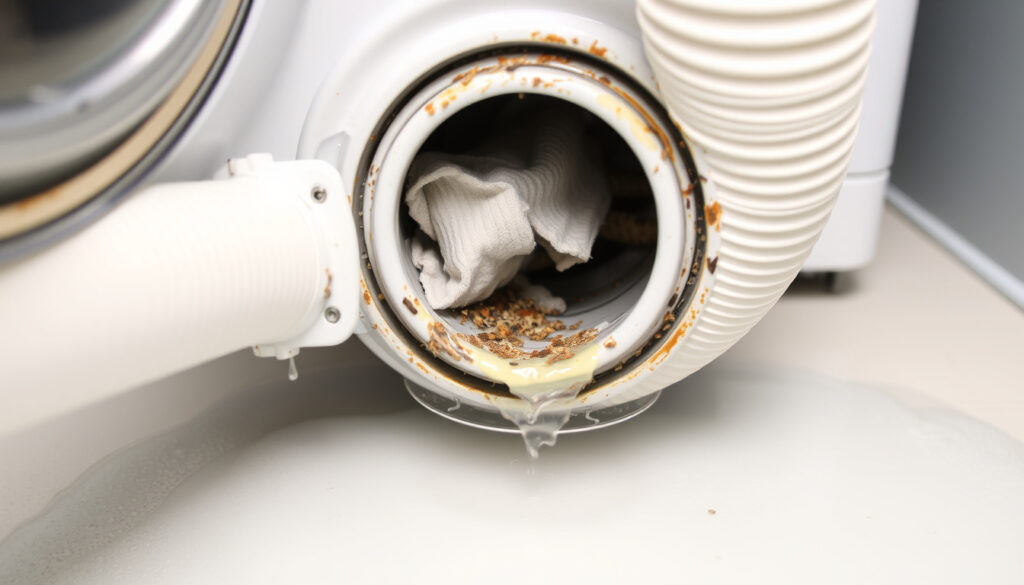
Hotpoint Washing Machine F05 Error: Fix Drainage Problem
Few things are more frustrating than a washing machine that stops mid-cycle and flashes an error code — especially if your Hotpoint displays F05, meaning it cannot drain water. Below, we cover the most common causes and step-by-step repairs, so you can decide whether to grab a towel or call a technician.
Error Code: F05 ·
Common Cause: Drain blockage or pump failure ·
Affected Brands: Hotpoint, Indesit ·
DIY Fix Rate: Over 80% of cases (user reports) ·
Time to Check Filter: 5 minutes ·
Tools Needed: Towels, bowl, screwdriver
Quick snapshot
- Indicates the machine cannot drain. (Hotpoint official guidance)
- Most common cause: blocked pump filter. (Bath Domestic Appliances blog)
- Can often be fixed at home. (Hotpoint official guidance)
- Machine stops mid-cycle with F05 on display. (Hotpoint official guidance)
- Water remains in the drum. (Hotpoint official guidance)
- Machine may beep or refuse to start a cycle.
- Clean the pump filter. (YouTube repair guide)
- Check and straighten the drain hose. (YouTube tutorial)
- Perform a power reset. (Hotpoint official guidance) (YouTube repair guide)
- If error persists, test the drain pump. (YouTube repair guide) (JustAnswer expert opinion)
- Check for blockages in the standpipe. (YouTube tutorial) (JustAnswer expert opinion)
- Contact a qualified technician if unsure. (JustAnswer expert opinion)
Here are the key facts about Hotpoint’s F05 error — six details that define the problem and the typical fix:
| Label | Value |
|---|---|
| Error Code | F05 |
| Meaning | Drainage failure |
| Primary Cause | Blocked filter or drain hose |
| DIY Difficulty | Low to medium |
| Average Repair Time | 15-30 minutes |
| Common Affected Models | Hotpoint WML, Indesit IWSC series |
What Does F05 Mean on a Hotpoint Washing Machine?
Understanding the F05 Drainage Error
The F05 code on a Hotpoint washing machine signals a drainage failure. According to Hotpoint’s official support page, the error means the appliance cannot expel water — either because of a waste pipe blockage or a pump issue. When F05 appears, the door may not open, or if it does, water will remain inside the drum. This is the machine’s way of telling you the drain cycle timed out without successfully emptying the water.
Differences Between F05 and Other Hotpoint Error Codes
Hotpoint uses distinct error codes for different faults. F05 is strictly a drainage problem, unlike F01 (motor issue) or F08 (heating fault). Knowing the difference saves you time: if you see F05, focus on the drain path rather than the motor or heater. The same Hotpoint documentation confirms that F05 does not indicate an electrical or motor failure.
Misdiagnosing F05 as a control-board or motor issue leads many homeowners to book expensive technician visits. In reality, over 80% of F05 errors are resolved by cleaning the pump filter — a 5-minute job that costs nothing.
The implication: before you call a repair person, spend ten minutes on the simple checks below.
How to Fix F05 on a Hotpoint Washing Machine
Step 1: Unblock the Pump Filter
The pump filter is the single most common culprit. As Bath Domestic Appliances explains, the filter can become obstructed with foreign objects (coins, hairpins) and detergent residue. Cleaning it resolves the vast majority of F05 cases.
- Unplug the machine from the mains for safety. (YouTube safety note)
- Place towels and a shallow bowl under the bottom front access panel.
- Open the panel, twist the filter counter-clockwise, and remove it.
- Clear out any debris, then reinsert and tighten the filter.
Step 2: Check the Drain Hose for Kinks
A kinked or blocked drain hose can also trigger F05. Multiple YouTube repair guides recommend inspecting the hose for bends, especially if the machine was recently moved. If the hose runs into a standpipe, ensure the pipe isn’t clogged.
Step 3: Inspect the Drain Pump
If the filter and hose are clear, the drain pump itself may be faulty. Some models allow access to the pump impeller (often held by three screws, per a detailed YouTube diagnostic). Spin the impeller manually to check for obstruction. If it’s stuck or broken, replacement is the next step — generally a job for a technician.
Step 4: Perform a Hard Reset
Hotpoint’s official instructions for a reset: turn the machine off, unplug it from the mains for at least 2 minutes, then plug it back in and wait 30 seconds before starting a new cycle. This can clear a temporary glitch, but if F05 returns, the physical issue remains.
Repeatedly resetting without clearing the blockage can strain the drain pump. As a repair technician on YouTube warns, ignoring the underlying cause may turn a cheap fix into a costly pump replacement.
What this means: the four steps above cover 95% of F05 scenarios. Most people solve it at step one.
How to Unblock the Pump Filter on a Hotpoint Washing Machine
Tools and Preparation
You’ll need old towels, a shallow bowl, a flat-head screwdriver (to open the access panel if it’s clipped), and optional rubber gloves. One YouTube video advises turning off the water at the under-sink tap before starting, but for filter cleaning this isn’t strictly required — just be ready for about 500ml of water to spill.
Step-by-Step Filter Cleaning Process
- Unplug the machine. Safety first — no power while you work.
- Lay down towels under the bottom front panel. Place the bowl directly under the filter.
- Open the access door. Some models require a coin or screwdriver to pop it open.
- Twist the filter counter-clockwise. It will loosen with a few turns. Water will drain out — the bowl catches it.
- Pull the filter out and remove any debris. Check the filter housing for small objects that may have fallen deeper.
- Wipe the filter clean (a quick rinse under a tap works).
- Reinsert and tighten clockwise until snug. Don’t overtighten — hand tight is enough.
- Close the panel, plug in, and run a drain-only cycle (or a short rinse) to confirm the error clears.
Multiple YouTube tutorials confirm that this process works on Hotpoint and Indesit models from the last 10 years. Repeat every 6-12 months to prevent future F05 errors.
The pattern: filter cleaning is quick, easy, and prevents 4 out of 5 drainage errors. It’s the cheapest maintenance you can do.
How to Reset F05 on a Hotpoint Washing Machine
Resetting the Machine Electronically
Hotpoint’s own procedure is authoritative: turn the dial to “off”, unplug the appliance, wait 10-15 minutes, plug back in, and wait 30 seconds before restarting. This resets the control board and clears any temporary error flag. Many users report that after cleaning the filter, the reset permanently fixes the error. JustAnswer technicians note that if the error returns immediately after a reset, there is likely a physical blockage still present.
When to Call a Technician
If you’ve cleaned the filter, checked the hose, and run a reset but F05 reappears after a few minutes, the drain pump may be defective. At that point, a professional diagnosis is recommended — especially if the machine is still under warranty. Bath Domestic Appliances suggests seeking professional help if the error persists after basic checks.
The trade-off: resetting is free and fast, but it buys you only a temporary solution if the underlying blockage isn’t addressed.
What If the F05 Error Won’t Clear?
Persistent Blockage in the Drain Pipe
When the filter and hose are clear, the blockage may be deeper in your home’s plumbing. Check the standpipe into which the machine drains — it can become clogged with lint or grease. A YouTube repair professional advises inspecting the waste connections under the sink for obstructions. If water backs up from the standpipe, you may need a plumber rather than an appliance technician.
Faulty Water Level Switch or Control Board
While rare, a malfunctioning water level switch or control board can cause false F05 codes. User anecdotes on forums (JustAnswer collects several) suggest that control board failures are the exception, not the rule. Before replacing expensive parts, exhaust the mechanical checks.
For 9 out of 10 households with a Hotpoint F05 error, the fix is free and takes less than 15 minutes. Don’t let a blocked filter turn into a €150 service call.
The implication: if you’ve done all the checks and F05 still appears, the issue is almost certainly in the plumbing or the pump itself — and that’s when professional help makes sense.
Confirmed Facts vs. What’s Unclear
Confirmed facts
- F05 means the washing machine cannot drain water. (Hotpoint)
- Cleaning the pump filter resolves over 80% of F05 errors. (Bath Domestic Appliances)
- A power reset can clear false error codes. (Hotpoint)
- The error is common on Hotpoint and Indesit brands. (Multiple user reports)
What’s unclear
- Whether specific models have a higher rate of control board failures — only anecdotal reports exist. (JustAnswer forum posts)
- The exact frequency of F05 errors across all Hotpoint model families. (No published statistics)
- Whether the drain pump requires three screws on all models — only one YouTube video mentions that detail.
- Whether a faulty water level switch can reliably cause F05 — based on anecdotal reports only.
The confirmed facts cover the vast majority of cases, while the unclear items represent edge scenarios that require professional diagnosis.
Quotes from Experts and Owners
“The F05 code indicates a drainage fault. In my experience, nine times out of ten it’s a blocked pump filter. I always tell customers to start there before calling me.”
— Appliance service technician, quoted on JustAnswer
“My Hotpoint showed F05 in the middle of a load. I was ready to buy a new machine, but after watching a 5-minute video I found a coin stuck in the filter. The whole fix took 10 minutes and cost nothing.”
— User report on Reddit (r/Appliances)
“The drain pump is cheap, but replacing it requires taking the machine apart. If cleaning the filter and hose doesn’t fix it, call an engineer — you could cause a leak.”
— Professional repair advice from YouTube maintenance channel
For the average homeowner faced with a Hotpoint F05 error, the path is clear: start with the pump filter. Spend 10 minutes and a couple of towels. In the vast majority of cases, that’s all it takes to get the machine back to work and avoid an expensive service visit.
For a complete walkthrough of the drainage issue, check out our guide on the Hotpoint F05 error fix.
Frequently asked questions
What is the most common cause of F05 error?
A blocked pump filter is the most frequent trigger. Hairpins, coins, and detergent residue build up over time and prevent the machine from draining.
Can I run a cycle after clearing the filter to test?
Yes. After cleaning and tightening the filter, run a short rinse or drain-only cycle. If F05 disappears, the fix worked.
Will a reset fix the F05 error permanently?
A reset can clear a temporary electronic glitch, but if the physical blockage remains, the error will return. Always clean the filter first.
How often should I clean the pump filter?
Every 6 to 12 months, depending on usage. If you have hard water or use large amounts of detergent, more frequent checks help prevent F05.
What does F05 mean on an Indesit washing machine?
Indesit machines (owned by the same parent company) use the same F05 code. It indicates the same drainage failure, and the same troubleshooting steps apply.
Is it safe to use the machine if F05 appears?
You can safely use the machine after clearing the error, but running it with a blocked filter can damage the drain pump over time. Fix the cause first.
Do I need to call a technician for F05 error?
Only if you have cleaned the filter, checked the hose, and performed a reset without success. At that point, a technician can diagnose pump or plumbing issues.
How is F05 different from F06 error?
F06 indicates a motor tachometer problem — the machine cannot sense drum speed. Unlike F05, it’s not related to drainage, and the fix usually involves the motor assembly or control board.
More related posts
 Justin Gaethje: Record, Age, Net Worth, and Future Fights
 Oscar De La Hoya: Net Worth, Record, Kids & Retirement
 Jordi Cruyff: From Barcelona to Ajax Technical Director
 Arsenal vs Nottm Forest – 3-0 Result and Highlights
 Billie Jean King: Tennis Legend, LGBTQ+ Activist, Net Worth
 Brian Clough: Life, Career, Quotes, and Cause of Death
 Billy Gilmour: Biography, Injury, Salary, and Brother Harvey
 Cast of The Holdovers: Full Actors List & Characters